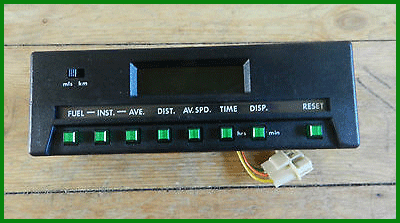
Have you ever wondered what all the various buttons are on the XJS trip computer — the dashboard-mounted unit that replaces the clock on some models?
Jaguar was well ahead of its time in this respect. As early as the early 1980s, the XJS could be specified with an onboard computer capable of tracking fuel usage, distance, speed, and time — decades before such features became commonplace.
The information required to understand the system does exist, but it is not always easy to find. This article brings together what is known, to make life a little easier for owners who wish to use the system as intended.
Trip Computer Functions
- mls / km — Switches displayed units between UK imperial and metric.
- RESET — Press and hold for five seconds to reset stored data (excluding time of day). Used in conjunction with the hrs and min buttons to adjust the clock.
<l
Please log in to continue reading this article.